---
url: /guide/getting-started.md
description: >-
快速了解如何安装和开始使用 @theojs/lumen 插件。本指南提供 pnpm、npm 和 yarn
安装命令,并概述主题导入、首页定制和内容组件等核心功能模块。
---
# 快速开始
## 安装
你可以通过以下三种包管理器安装 `@theojs/lumen` 插件,选择你熟悉的方式即可
::: code-group
```sh [pnpm]
pnpm add @theojs/lumen
```
```sh [npm]
npm install @theojs/lumen
```
```sh [yarn]
yarn add @theojs/lumen
```
:::
## 最小配置
在 `.vitepress/theme/index.ts` 中继承 VitePress 默认主题、导入 Lumen 样式,并注册需要使用的组件:
```ts [.vitepress/theme/index.ts]
import type { EnhanceAppContext } from 'vitepress'
import DefaultTheme from 'vitepress/theme'
import { Pill } from '@theojs/lumen'
import '@theojs/lumen/style'
export default {
extends: DefaultTheme,
enhanceApp({ app }: EnhanceAppContext) {
app.component('Pill', Pill)
}
}
```
注册后即可在任意 Markdown 页面中使用:
```vue-html
```
::: warning 仅传入可信内容
部分组件的 `name`、`desc`、`title`、`label` 等字段以及 `IconType.svg` 会作为 HTML 渲染。请只传入可信的静态配置;若内容来自用户或外部接口,请先进行安全过滤,避免 XSS 风险。
:::
## 主要功能模块导航
以下是 `@theojs/lumen` 插件的核心功能模块入口,点击即可查看详细配置和用法
---
---
url: /guide/theme.md
description: >-
了解如何配置和自定义 @theojs/lumen VitePress
主题。本指南包括主题CSS导入(全部或部分)、Iconify图标支持配置、CSS变量覆盖方法,并展示了容器、徽章和明暗模式图片等内置样式示例。
---
# 配置主题
## 主题样式导入
::: code-group
```ts [全量导入]
// .vitepress/theme/index.ts
import '@theojs/lumen/style'
```
```ts [按需导入]
// .vitepress/theme/index.ts
/* 徽章样式 */
import '@theojs/lumen/badge'
/* 首页按钮 */
import '@theojs/lumen/button'
/* 主题配色 */
import '@theojs/lumen/colors'
/* 文档基础样式 */
import '@theojs/lumen/doc'
/* 容器样式(警告、提示块等) */
import '@theojs/lumen/doc-blocks'
/* 首页样式 */
import '@theojs/lumen/home'
/* 图标样式 */
import '@theojs/lumen/icon'
/* 图片样式 */
import '@theojs/lumen/pic'
```
:::
::: tip
从 `@theojs/lumen` 根入口导入组件时会自动加载 `components-var.css`,全量样式 `@theojs/lumen/style` 也已包含它,通常无需再单独导入 `@theojs/lumen/components-var`。
:::
## 图标支持
### 示例
```vue-html
```
## 自定义组件 CSS
默认使用 CSS 变量来管理样式。你可以通过覆盖根级 CSS 变量,轻松实现主题颜色及样式的个性化定制。
### 在主题入口导入自定义变量文件
```ts
// .vitepress/theme/index.ts
import DefaultTheme from 'vitepress/theme'
import '@theojs/lumen/style'
// [!code ++]
import './var.css'
export default DefaultTheme
```
### 在 `var.css` 中覆盖变量
```css
/* .vitepress/theme/var.css */
:root {
--lm-Notice-bg: var(--vp-button-alt-bg);
--lm-Notice-bg-hover: var(--vp-c-brand-soft);
}
```
查看 文件中查看所有可用变量,方便针对性覆盖。
## 内置样式示例
### 1. 容器
容器用于显示信息提示、警告、注意事项等内容,支持多种内置类型:
**输入**
```md
> [这是一个链接](https://doc.theojs.net/)
>
> 这是一段文字
::: info
[这是一个链接](https://doc.theojs.net/)
这是一段文字
:::
::: tip
[这是一个链接](https://doc.theojs.net/)
这是一段文字
:::
::: warning
[这是一个链接](https://doc.theojs.net/)
这是一段文字
:::
::: danger
[这是一个链接](https://doc.theojs.net/)
这是一段文字
:::
::: details
[这是一个链接](https://doc.theojs.net/)
这是一段文字
:::
```
**输出**
> [这是一个链接](https://doc.theojs.net/)
>
> 这是一段文字
::: info
[这是一个链接](https://doc.theojs.net/)
这是一段文字
:::
::: tip
[这是一个链接](https://doc.theojs.net/)
这是一段文字
:::
::: warning
[这是一个链接](https://doc.theojs.net/)
这是一段文字
:::
::: danger
[这是一个链接](https://doc.theojs.net/)
这是一段文字
:::
::: details
[这是一个链接](https://doc.theojs.net/)
这是一段文字
:::
### 2. 自定义容器
**输入**
````md
::: danger STOP
[这是一个链接](https://doc.theojs.net/)
:::
::: details Click me to view the code
```js
console.log('Hello, VitePress!')
```
:::
````
**输出**
::: danger STOP
[这是一个链接](https://doc.theojs.net/)
:::
::: details Click me to view the code
```js
console.log('Hello, VitePress!')
```
:::
### 3. GitHub 风格容器
**输入**
```md
> [!NOTE]
>
> [这是一个链接](https://doc.theojs.net/)
>
> 这是一段文字
> [!TIP]
>
> [这是一个链接](https://doc.theojs.net/)
>
> 这是一段文字
> [!IMPORTANT]
>
> [这是一个链接](https://doc.theojs.net/)
>
> 这是一段文字
> [!WARNING]
>
> [这是一个链接](https://doc.theojs.net/)
>
> 这是一段文字
> [!CAUTION]
>
> [这是一个链接](https://doc.theojs.net/)
>
> 这是一段文字
```
**输出**
> \[!NOTE]
>
> [这是一个链接](https://doc.theojs.net/)
>
> 这是一段文字
> \[!TIP]
>
> [这是一个链接](https://doc.theojs.net/)
>
> 这是一段文字
> \[!IMPORTANT]
>
> [这是一个链接](https://doc.theojs.net/)
>
> 这是一段文字
> \[!WARNING]
>
> [这是一个链接](https://doc.theojs.net/)
>
> 这是一段文字
> \[!CAUTION]
>
> [这是一个链接](https://doc.theojs.net/)
>
> 这是一段文字
### 4. Badge 组件
`Badge` 是 VitePress 默认主题提供的组件,Lumen 的 `badge` 样式会调整它的外观;它不是 Lumen 单独导出的 Vue 组件。
```vue-html
custom element
custom element
```
custom element
custom element
### 5. 图片的浅色和深色模式支持
**输入**
```md
{.light-only}
{.dark-only}


```
**输出**
{.light-only}
{.dark-only}


### 6. 首页 actions 添加图片
查看 [自定义组件 css](#自定义组件-css) 将下方的内容更换为自己的图片链接
```css [.vitepress/theme/var.css]
:root {
--lm-button-author: url('https://i.theojs.net/logo/avatar-mini.webp');
--lm-button-logo: url('https://i.theojs.net/logo/lumen-logo-mini.svg');
}
```
```yaml [index.md]
---
layout: home
hero:
actions:
- theme: brand author
text: Theo-Docs
link: https://doc.theojs.net/
- theme: alt author
text: Theo-Docs
link: https://doc.theojs.net/
- theme: brand logo
text: Lumen
link: https://lumen.theojs.net/
- theme: alt logo
text: Lumen
link: https://lumen.theojs.net/
features: ...
---
```
## 解决方案
### 使用 `iconify-icon` 时报错: `[Vue warn]: Failed to resolve component: iconify-icon`
```ts [.vitepress/config.mts]
import { defineConfig } from 'vitepress'
export default defineConfig({
// [!code ++]
vue: {
// [!code ++]
template: {
// [!code ++]
compilerOptions: { isCustomElement: (tag) => tag === 'iconify-icon' }
} // [!code ++]
} // [!code ++]
})
```
### 使用 [vitepress-plugin-image-viewer](https://www.npmjs.com/package/vitepress-plugin-image-viewer) 时排除组件内的图像
```ts [.vitepress/theme/index.ts]
// [!code ++]
import { useRoute } from 'vitepress'
// [!code ++]
import imageViewer from 'vitepress-plugin-image-viewer'
import DefaultTheme from 'vitepress/theme'
// [!code ++]
import 'viewerjs/dist/viewer.min.css'
export default {
extends: DefaultTheme,
// [!code ++]
setup() {
const route = useRoute() // [!code ++]
// [!code ++]
imageViewer(route, '.vp-doc', {
filter: (img: HTMLImageElement) => !img.hasAttribute('data-no-viewer') // [!code ++]
}) // [!code ++]
} // [!code ++]
}
```
### 组件图像默认加载行为
在组件中,图像默认使用 `loading="lazy"`,即图片会在接近视口时才开始加载,以优化页面加载速度和性能。
**如果需要修改默认行为**
如果你希望图像在页面加载时立即加载,你可以显式地在组件中设置 `loading="eager"`。
```vue-html
```
---
---
url: /guide/notice.md
description: >-
了解如何使用 @theojs/lumen 插件,为你的 VitePress
网站首页添加一个引人注目的公告栏组件。轻松配置和展示活动信息、重要通知或快速安装命令,有效提升首页互动性和信息传递效率。
---
# 首页公告栏组件 - Notice
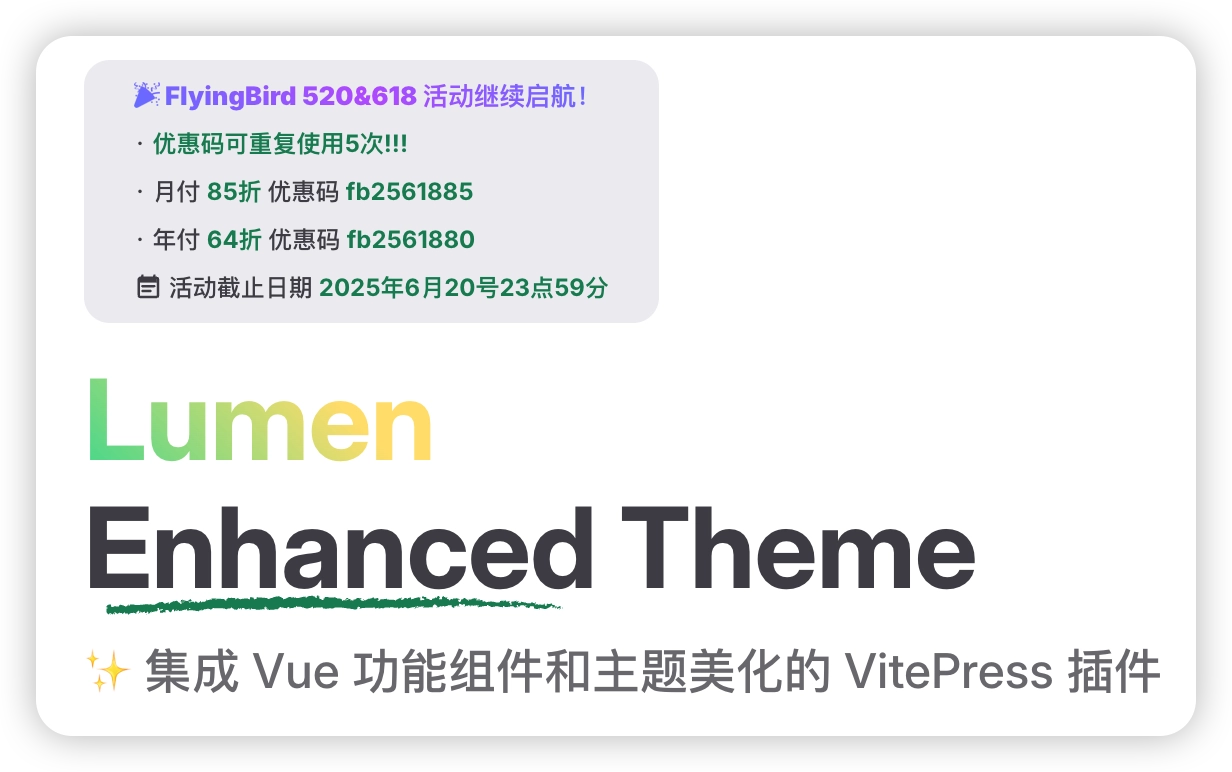
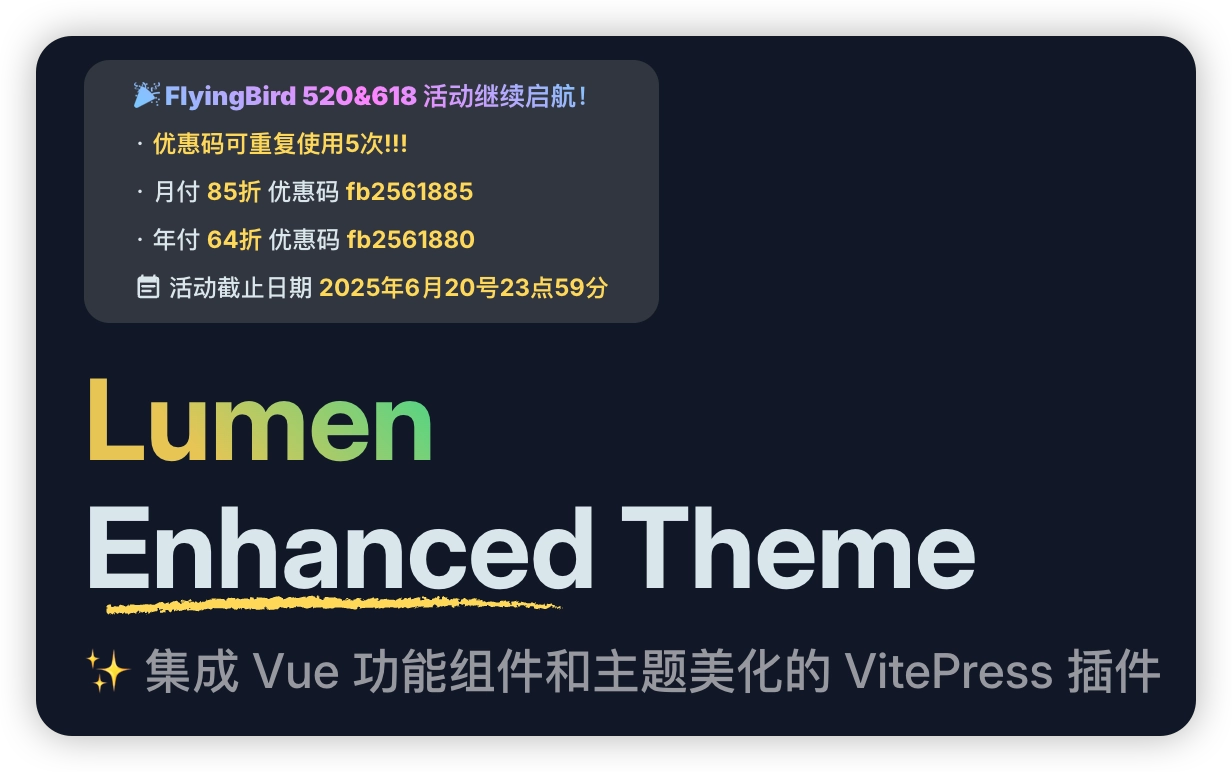
## 引入组件
```ts [.vitepress/theme/index.ts]
import DefaultTheme from 'vitepress/theme'
// [!code ++]
import { h } from 'vue'
// [!code ++]
import { Notice } from '@theojs/lumen'
export default {
extends: DefaultTheme,
// [!code ++]
Layout() {
// [!code ++]
return h(DefaultTheme.Layout, null, {
// [!code ++]
'home-hero-info-before': () => h(Notice)
}) // [!code ++]
} // [!code ++]
}
```
## 配置公告栏
在站点内容根目录的 `index.md` 中配置 `hero.Notice`。字段名 `Notice` 区分大小写。
```yaml{4-12} [index.md]
---
layout: home
hero:
Notice:
title: '🎉 Lumen 新功能发布'
desc: | # 支持 YAML 的换行符,保持多行格式
· 查看更新说明与使用示例
· 欢迎在项目仓库提交反馈
date: '2026年12月31日'
dateIcon: 'mdi:calendar-star'
dateText: '活动时间'
link: 'https://github.com/s-theo/lumen'
---
```
## 数据接口说明
| 字段 | 类型 | 描述 | 是否必填 |
| ----------- | ------------ | ------------------------------------------------------------------------------------------------------------------------------------------------------------------------------------------------ | --------------------- |
| `link` | `LinkType` | 链接地址,点击后跳转的目标 URL。 | |
| `rel` | `RelType` | 链接的 `rel` 属性,用于控制链接的安全性和行为,如防止新窗口跳转时的安全风险(`noopener`)、避免搜索引擎跟踪(`nofollow`)等。 | |
| `target` | `TargetType` | 链接的目标窗口。默认根据链接地址判断:外部链接默认在新标签页打开(`_blank`),内部链接无默认值(`即当前页打开`)。可自定义覆盖该行为。 | |
| `title` | `string` | 链接显示的标题文本,突出展示的主要内容。 | |
| `desc` | `string` | 链接下方的补充描述内容,可用于详细说明或附加信息。 | |
| `date` | `string` | 活动截止日期或相关时间信息,通常用于提示有效期限。 | |
| `dateText` | `string` | 活动时间的文字说明,仅在设置 `date` 时显示;默认值为 `活动时间: 即日至`。 | |
| `dateIcon` | `IconType` | 日期图标,仅在设置 `date` 时显示。建议与 `dateImage` 二选一;同时设置时优先显示 `dateIcon`。两者都未定义时使用默认图标 `heroicons:calendar-days`。详情查看 [IconType](#IconType) | |
| `dateImage` | `ImageType` | 日期图片,仅在设置 `date` 时显示。建议与 `dateIcon` 二选一;同时设置时优先显示 `dateIcon`。两者都未定义时使用默认图标 `heroicons:calendar-days`。详情查看 [ImageType](#ImageType) | |
## IconType
```ts
export type IconMode = string | { light: string; dark: string }
export type IconType =
| string
| { icon: string; color?: IconMode }
| { light: string; dark: string; color?: IconMode }
| { svg: IconMode }
```
## ImageType
```ts
export type ImageType =
| string
| { src: string; crop?: boolean; [prop: string]: any }
| { light: string; dark: string; crop?: boolean; [prop: string]: any }
```
## 其他公共类型
```ts
export type SizeType = null | string | number
export type LinkType = string | undefined
export type RelType = string | undefined
export type TargetType = string | undefined
```
---
---
url: /guide/underline.md
description: >-
学习如何使用 @theojs/lumen 插件的 Underline 组件,为 VitePress
网站首页的hero区域标题文本添加美观的动态下划线效果。本指南包含组件引入、属性配置及在首页布局中使用的详细步骤,提升首页视觉吸引力和用户体验。
---
# 首页下划线组件 - Underline


## 引入组件
```ts [.vitepress/theme/index.ts]
// [!code ++]
import type { EnhanceAppContext } from 'vitepress'
import DefaultTheme from 'vitepress/theme'
// [!code ++]
import { Underline } from '@theojs/lumen'
export default {
extends: DefaultTheme,
// [!code ++]
enhanceApp: ({ app }: EnhanceAppContext) => {
// [!code ++]
app.component('Underline', Underline)
} // [!code ++]
}
```
## 使用示例
在站点内容根目录的首页 Markdown 文件(通常是 `index.md`)中,通过设置 `layout: home` 使用首页布局,并在 `hero` 区域中配置标题文本,同时在页面内容中插入 `` 组件渲染带有动态下划线效果的标题。
```yaml [index.md]
---
layout: home
hero:
name: Lumen
text: Enhanced # [!code ++] 副标题文本前半部分,下划线会作用于这里
textsuffix: Theme # [!code ++] 副标题文本后半部分
tagline: ✨ 专为 VitePress 打造的主题美化与 Vue 扩展组件库
---
# [!code ++]
```
::: tip
`Underline` 会读取当前页面的 `hero.text` 和 `hero.textsuffix`,并替换 VitePress 默认首页 Hero 的标题节点。请仅在默认首页布局中使用一次;自定义 Hero DOM 结构时可能无法定位目标节点。
:::
## 接口数据说明
| 属性名 | 说明 |
| ------------ | ------------------------------------ |
| `text` | 副标题文本的前半部分(**带下划线**) |
| `textsuffix` | 副标题文本的后半部分 |
---
---
url: /guide/footer.md
description: >-
了解如何使用 @theojs/lumen 插件的 Footer 组件自定义 VitePress
网站的页脚。本指南包含数据配置(链接分组、备案信息、作者)和组件集成步骤,助你打造个性化且信息丰富的网站底部。
---
# 页脚组件 - Footer
::: info
`Footer` 默认只在 `layout: home` 的页面渲染。也可通过 frontmatter 的 `isHome: true` 显式启用;`isHome: false` 会覆盖首页布局判断并关闭显示。
:::
## 创建数据 (点击打开查看)
::: details 在`.vitepress`目录下新建`data/FooterData.ts````ts \[.vitepress/data/FooterData.ts]
import type { FooterData } from '@theojs/lumen'
export const Footer_Data: FooterData = {
beian: {
showIcon: true,
icp: {
icon: {
light: 'fluent:globe-shield-48-filled',
dark: 'fluent:globe-shield-48-filled',
color: { light: 'rgba(20, 150, 255, 1)', dark: 'rgba(100, 200, 255, 1)' }
},
number: '粤ICP备12345678号',
rel: 'noopener noreferrer'
},
police: {
image: {
light: 'https://example.com/light-image.png',
dark: 'https://example.com/dark-image.png',
crop: true
},
number: '粤公网安备12345678号',
rel: 'noopener noreferrer'
}
},
author: {
icon: {
light: 'mdi:copyright',
dark: 'mdi:copyright',
color: { light: '#999', dark: '#ccc' }
},
name: 'Theo',
link: 'https://theojs.net',
rel: 'noopener noreferrer'
},
group: [
{
icon: {
svg: ``
},
title: '外部链接',
links: [
{
icon: {
svg: {
light: ``,
dark: ``
}
},
name: '示例1',
link: 'https://example1.com',
rel: 'noopener noreferrer'
},
{
name: '示例2',
link: 'https://example2.com'
// icon 和 color 可省略
}
]
},
{
icon: {
light: 'bx:link',
dark: 'bx:link',
color: { light: 'rgba(255, 87, 51, 1)', dark: 'rgba(255, 130, 100, 1)' }
},
title: '内部链接',
links: [
{
icon: {
light: 'solar:book-bold',
dark: 'solar:book-bold',
color: { light: 'rgba(200, 100, 50, 1)', dark: 'rgba(255, 150, 100, 1)' }
},
name: '示例1',
link: '/docs',
rel: 'noopener noreferrer'
},
{
name: '示例2',
link: '/page'
// icon 和 color 可省略
}
]
}
]
}
```
::: details 或者支持 `i18n````ts \[.vitepress/data/FooterData_i18n.ts]
import type { FooterData } from '@theojs/lumen'
export const Footer_Data: FooterData = {
i18n: {
root: {
beian: {
showIcon: true,
icp: {
icon: {
light: 'fluent:globe-shield-48-filled',
dark: 'fluent:globe-shield-48-filled',
color: { light: 'rgba(20, 150, 255, 1)', dark: 'rgba(100, 200, 255, 1)' }
},
number: '粤ICP备12345678号',
rel: 'noopener noreferrer'
}
}
// ...其他项省略
},
en: {
beian: {
showIcon: true,
icp: {
icon: {
light: 'fluent:globe-shield-48-filled',
dark: 'fluent:globe-shield-48-filled',
color: { light: 'rgba(20, 150, 255, 1)', dark: 'rgba(100, 200, 255, 1)' }
},
number: 'ICP 12345678',
rel: 'noopener noreferrer'
}
}
// ...其他项省略
}
}
}
```
::: warning
匹配到当前语言后,语言对象会整体替换根级 Footer 数据,不会进行深度合并。请在每个语言对象中完整填写需要展示的 `group`、`beian`、`author` 和 `noIcon` 字段。
:::
## 引入组件
::: tip
`../data/FooterData` 可替换为实际存放数据的路径。
:::
```ts [.vitepress/theme/index.ts]
import DefaultTheme from 'vitepress/theme'
// [!code ++]
import { h } from 'vue'
// [!code ++]
import { Footer } from '@theojs/lumen'
// [!code ++]
import { Footer_Data } from '../data/FooterData'
export default {
extends: DefaultTheme,
// [!code ++]
Layout() {
// [!code ++]
return h(DefaultTheme.Layout, null, {
// [!code ++]
'layout-bottom': () => h(Footer, { Footer_Data })
}) // [!code ++]
} // [!code ++]
}
```
## 数据接口说明
### `FooterData` 接口
`FooterData` 是 Footer 组件的顶层数据接口,包含以下字段:
| 字段 | 类型 | 描述 | 是否必填 |
| -------- | --------------------------------------------------- | -------------------------------------------------------------------- | --------------------- |
| `i18n` | `Record>>` | 多语言数据配置 | |
| `group` | `Group[]` | 链接分组数组,支持多个分组配置,每个分组包含标题、图标、链接等信息。 | |
| `beian` | `Beian` | ICP 备案与公安备案配置,用于展示网站备案合规信息。 | |
| `author` | `Author` | 作者信息展示,包含作者名称、链接与版权图标,常用于页脚归属标识。 | |
| `noIcon` | `boolean` | 是否隐藏所有外部链接的外链图标 | |
### `Group` 接口
`Group` 接口定义了一个链接分组,包括分组的图标、标题及其下的多个链接。
| 字段 | 类型 | 描述 | 是否必填 |
| -------- | ----------- | -------------------------------------------------------------------------------------------------------- | --------------------- |
| `noIcon` | `boolean` | 是否隐藏该分组下所有外部链接的外链图标 | |
| `icon` | `IconType` | 图标配置,支持字符串或对象及深浅色模式。建议与 `image` 二选一;同时设置时优先显示 `icon`。详情查看 [IconType](#IconType) | |
| `image` | `ImageType` | 图片配置,支持字符串或对象及深浅色模式。建议与 `icon` 二选一;同时设置时优先显示 `icon`。详情查看 [ImageType](#ImageType) | |
| `title` | `string` | 分组标题,将展示为该链接组的名称。 | |
| `links` | `Link[]` | 分组内的链接数组,参考下方 [Link 接口](#link-接口)。 | |
### `Link` 接口
`Link` 接口用于描述具体的链接信息,包括链接的图标、样式、名称、地址及其打开方式。
| 字段 | 类型 | 描述 | 是否必填 |
| -------- | ------------ | -------------------------------------------------------------------------------------------------------------------------------------- | --------------------- |
| `noIcon` | `boolean` | 是否隐藏该链接的外部链接图标 | |
| `icon` | `IconType` | 图标配置,支持字符串或对象及深浅色模式。建议与 `image` 二选一;同时设置时优先显示 `icon`。详情查看 [IconType](#IconType) | |
| `image` | `ImageType` | 图片配置,支持字符串或对象及深浅色模式。建议与 `icon` 二选一;同时设置时优先显示 `icon`。详情查看 [ImageType](#ImageType) | |
| `name` | `string` | 链接显示的文本。 | |
| `link` | `LinkType` | 链接地址,可为外部 URL 或内部路径,如 `/docs`。 | |
| `rel` | `RelType` | 设置链接的 `rel` 属性,常见如 `noopener noreferrer`,用于安全性或 SEO 考虑。 | |
| `target` | `TargetType` | 链接的目标窗口。默认根据链接地址判断:外部链接默认在新标签页打开(`_blank`),内部链接无默认值(`即当前页打开`)。可自定义覆盖该行为。 | |
### `Beian` 接口
`Beian` 接口用于表示备案信息,包括 ICP 备案号、公安备案号以及是否显示备案图标。
| 字段 | 类型 | 描述 | 是否必填 |
| ---------- | --------- | -------------------------------------------------------------------- | --------------------- |
| `icp` | `Icp` | ICP 备案信息配置。 | |
| `police` | `Police` | 公安备案信息配置。 | |
| `showIcon` | `boolean` | 是否显示ICP和公安备案图标,默认值为 `false`,开启后将渲染图标/图片。 | |
#### `Icp` 接口
`Icp` 接口表示 ICP 备案信息。
| 字段 | 类型 | 描述 | 是否必填 |
| -------- | --------------------- | ------------------------------------------------------------------------------------------------------------------------------------------------------------------------------------------------------- | --------------------- |
| `number` | `string` | ICP 备案号文本,例如 `粤ICP备88888888号`,也可用于其他类似用途的自定义文本。 | |
| `link` | `LinkType` | 指向工信部网站备案系统的链接,默认为:`https://beian.miit.gov.cn/`,支持自定义 | |
| `icon` | `IconType` | ICP 图标,仅在 `showIcon` 为 `true` 时显示。建议与 `image` 二选一;同时设置时优先显示 `icon`,两者都未设置时显示默认图标。详情查看 [IconType](#IconType) | |
| `image` | `ImageType` | ICP 图片,仅在 `showIcon` 为 `true` 时显示。建议与 `icon` 二选一;同时设置时优先显示 `icon`,两者都未设置时显示默认图标。详情查看 [ImageType](#ImageType) | |
| `rel` | `RelType` | 设置链接的 `rel` 属性,未设置时组件默认为 `nofollow`。 | |
| `target` | `TargetType` | 链接的目标窗口。默认根据链接地址判断:外部链接默认在新标签页打开(`_blank`),内部链接无默认值(`即当前页打开`)。可自定义覆盖该行为。 | |
#### `Police` 接口
`Police` 接口表示公安备案信息。
| 字段 | 类型 | 描述 | 是否必填 |
| -------- | ------------ | -------------------------------------------------------------------------------------------------------------------------------------- | --------------------- |
| `number` | `string` | 公安备案号文本,例如 `粤公网安备 88888888888888 号`,用于展示公安机关备案信息,也可用于其他类似用途的自定义文本。 | |
| `link` | `LinkType` | 公安备案号对应的查询链接,默认为:`https://beian.mps.gov.cn/`,支持自定义 | |
| `icon` | `IconType` | 公安备案图标,仅在 `showIcon` 为 `true` 时显示。建议与 `image` 二选一;同时设置时优先显示 `icon`,两者都未设置时显示默认图标。详情查看 [IconType](#IconType) | |
| `image` | `ImageType` | 公安备案图片,仅在 `showIcon` 为 `true` 时显示。建议与 `icon` 二选一;同时设置时优先显示 `icon`,两者都未设置时显示默认图标。详情查看 [ImageType](#ImageType) | |
| `rel` | `RelType` | 设置链接的 `rel` 属性,常见如 `noopener noreferrer`,用于安全性或 SEO 考虑。 | |
| `target` | `TargetType` | 链接的目标窗口。默认根据链接地址判断:外部链接默认在新标签页打开(`_blank`),内部链接无默认值(`即当前页打开`)。可自定义覆盖该行为。 | |
### `Author` 接口
`Author` 接口表示作者信息,包括作者姓名和链接。
| 字段 | 类型 | 描述 | 是否必填 |
| ----------- | ------------ | ---------------------------------------------------------------------------------------------------------------------------------------- | --------------------- |
| `icon` | `IconType` | 版权图标。建议与 `image` 二选一;同时设置时优先显示 `icon`,两者都未设置时显示默认版权图标。详情查看 [IconType](#IconType) | |
| `image` | `ImageType` | 版权图片。建议与 `icon` 二选一;同时设置时优先显示 `icon`,两者都未设置时显示默认版权图标。详情查看 [ImageType](#ImageType) | |
| `startYear` | `number` | 版权的起始年份,表示作者首次拥有版权的年份或版权开始生效的年份。如果未提供,则不显示年份范围。 | |
| `name` | `string` | 作者或站点拥有者的名称,将展示在页脚中。 | |
| `link` | `LinkType` | 作者链接地址,若未填写,则默认拼接为 `https://github.com/${name}`。 | |
| `rel` | `RelType` | 设置链接的 `rel` 属性,常见如 `noopener noreferrer`,用于安全性或 SEO 考虑。 | |
| `target` | `TargetType` | 链接的目标窗口。默认根据链接地址判断:外部链接默认在新标签页打开(`_blank`),内部链接无默认值(`即当前页打开`)。可自定义覆盖该行为。 | |
| `text` | `string` | 版权声明尾句,显示在作者名称后。可自定义该文本,默认值为 `All Rights Reserved.`。 | |
## IconType
```ts
export type IconMode = string | { light: string; dark: string }
export type IconType =
| string
| { icon: string; color?: IconMode }
| { light: string; dark: string; color?: IconMode }
| { svg: IconMode }
```
## ImageType
```ts
export type ImageType =
| string
| { src: string; crop?: boolean; [prop: string]: any }
| { light: string; dark: string; crop?: boolean; [prop: string]: any }
```
## 其他公共类型
```ts
export type SizeType = null | string | number
export type LinkType = string | undefined
export type RelType = string | undefined
export type TargetType = string | undefined
```
---
---
url: /guide/aside.md
description: >-
学习如何使用 @theojs/lumen 插件的 Aside 组件,在 VitePress
站点的侧边栏添加自定义链接、推广信息或品牌Logo。本指南将引导你配置数据并集成组件,以丰富侧边栏内容和提升用户体验。
---
# 侧边栏链接组件 - Aside
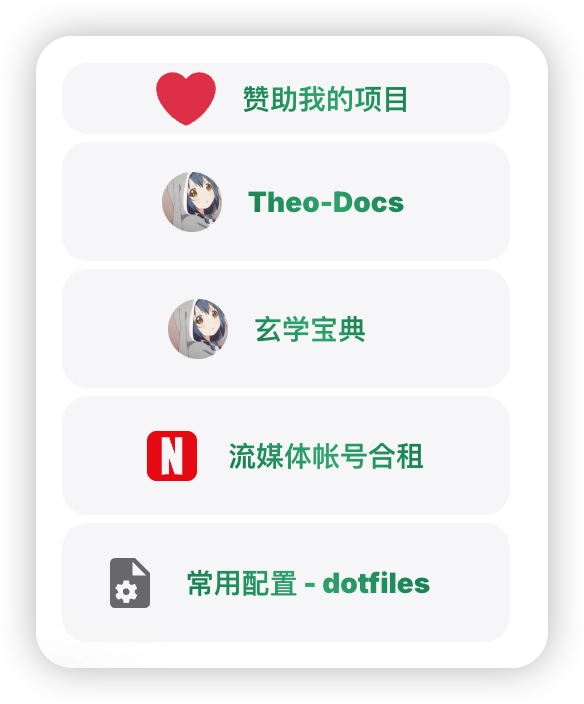
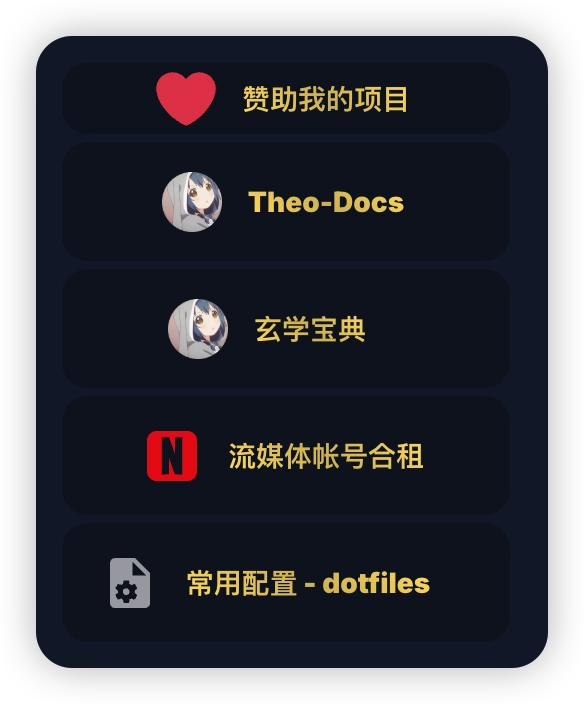
## 创建数据 (点击打开查看)
::: details 在 `.vitepress` 目录下新建 `data/AsideData.ts````ts \[.vitepress/data/AsideData.ts]
import type { AsideItem } from '@theojs/lumen'
export const Aside_Data: AsideItem = [
{
image: 'https://example.com/icon.webp',
promo: '活动标题',
info1: '简介1',
info2: '简介2',
link: 'https://example.com/'
},
{
image: 'https://example.com/icon.webp',
name: '标题',
hide1: '隐藏信息1',
hide2: '隐藏信息2',
link: 'https://example.com/'
},
{
icon: 'twemoji:red-heart',
name: '使用iconify图标',
link: 'https://example.com/'
},
{
icon: {
light: 'heroicons:sun-20-solid',
dark: 'heroicons:moon-20-solid',
color: { light: '#f59e0b', dark: '#818cf8' }
},
name: 'iconify图标的 light/dark 模式',
link: 'https://example.com/'
},
{
icon: {
svg: ``
},
name: 'svg 图标',
link: 'https://example.com/'
},
{
icon: {
svg: {
light: ``,
dark: ``
}
},
name: 'svg 图标的 light/dark 模式',
link: 'https://example.com/'
},
{
image: 'https://i.theojs.net/logo/github.svg',
name: '图片',
link: 'https://xx.theojs.net/'
},
{
image: { light: 'https://i.theojs.net/logo/github.svg', dark: 'https://i.theojs.net/logo/github-dark.svg' },
name: '图片的 light/dark 模式',
link: 'https://xx.theojs.net/'
}
]
```
::: details 或者支持 `i18n````ts \[.vitepress/data/AsideData_i18n.ts]
import type { AsideItem } from '@theojs/lumen'
export const Aside_Data: AsideItem = {
i18n: {
root: [
{
image: 'https://example.com/icon.webp',
promo: '活动标题',
info1: '简介1',
info2: '简介2',
link: 'https://example.com/'
}
// ...其他项省略
],
en: [
{
image: 'https://example.com/icon.webp',
promo: 'Promotion Title',
info1: 'Introduction 1',
info2: 'Introduction 2',
link: 'https://example.com/'
}
// ...其他项省略
]
}
}
```
```ts \[.vitepress/data/AsideData_item_i18n.ts]
import type { AsideItem } from '@theojs/lumen'
export const Aside_Data: AsideItem = [
{
image: 'https://example.com/icon.webp',
promo: '活动标题',
info1: '简介',
link: 'https://example.com/',
i18n: {
en: {
promo: 'Promotion title',
info1: 'Introduction'
}
}
},
{
image: 'https://example.com/icon.webp',
name: '普通链接',
hide1: '悬停提示',
link: 'https://example.com/',
i18n: {
en: {
name: 'Link',
hide1: 'Hover tip'
}
}
}
]
```
## 引入组件
```ts [.vitepress/theme/index.ts]
import DefaultTheme from 'vitepress/theme'
// [!code ++]
import { h } from 'vue'
// [!code ++]
import { Aside } from '@theojs/lumen'
// [!code ++]
import { Aside_Data } from '../data/AsideData'
export default {
extends: DefaultTheme,
Layout() {
// [!code ++]
return h(DefaultTheme.Layout, null, {
// [!code ++]
'aside-ads-before': () => h(Aside, { Aside_Data })
}) // [!code ++]
} // [!code ++]
}
```
## 数据接口说明
### Promo
| 字段 | 类型 | 描述 | 是否必填 |
| -------- | ------------ | -------------------------------------------------------------------------------------------------------------------------------------- | --------------------- |
| `promo` | `string` | 活动标题,例如:`"限时折扣"`。 | |
| `link` | `LinkType` | 跳转链接,支持外部或内部地址。 | |
| `rel` | `RelType` | 链接的 `rel` 属性,建议设置为 `noopener noreferrer` 以增强安全性。 | |
| `target` | `TargetType` | 链接的目标窗口。默认根据链接地址判断:外部链接默认在新标签页打开(`_blank`),内部链接无默认值(`即当前页打开`)。可自定义覆盖该行为。 | |
| `icon` | `IconType` | 图标配置,支持字符串或对象,支持深浅色模式和颜色配置。详情查看 [IconType](#IconType) | |
| `image` | `ImageType` | 图片配置,支持字符串或对象,支持深浅色模式和裁剪。详情查看 [ImageType](#ImageType) | |
| `size` | `SizeType` | 控制图片或者图标的`width`和`height` 默认值为 `32` | |
| `info1` | `string` | 附加信息 1,例如:`"新用户立减 5 元"`。 | |
| `info2` | `string` | 附加信息 2,例如:`"优惠截止至 6 月 30 日"`。 | |
### Normal
| 字段 | 类型 | 描述 | 是否必填 |
| -------- | ------------ | -------------------------------------------------------------------------------------------------------------------------------------- | --------------------- |
| `name` | `string` | 显示名称,例如:`"哔哩哔哩"`。 | |
| `link` | `LinkType` | 跳转链接,支持外部或内部地址。 | |
| `rel` | `RelType` | 链接的 `rel` 属性,建议设置为 `noopener noreferrer` 以增强安全性。 | |
| `target` | `TargetType` | 链接的目标窗口。默认根据链接地址判断:外部链接默认在新标签页打开(`_blank`),内部链接无默认值(`即当前页打开`)。可自定义覆盖该行为。 | |
| `icon` | `IconType` | 图标配置,支持字符串或对象,支持深浅色模式和颜色配置。详情查看 [IconType](#IconType) | |
| `image` | `ImageType` | 图片配置,支持字符串或对象,支持深浅色模式和裁剪。详情查看 [ImageType](#ImageType) | |
| `size` | `SizeType` | 控制图片或者图标的`width`和`height` 默认值为 `32` | |
| `hide1` | `string` | 隐藏信息 1,悬停时显示。例如:`"仅限中国大陆用户"`。 | |
| `hide2` | `string` | 隐藏信息 2,用于补充额外提示。例如:`"每日限量 500 名"`。 | |
### AsidePromo
`AsidePromo` 继承 `Promo`,并支持按语言覆盖单项字段。
| 字段 | 类型 | 描述 | 是否必填 |
| ------ | --------------------------------------------------- | --------------------------------------------------------------------- | --------------------- |
| ... | 同 `Promo` 接口 | 同上,字段不再赘述。 | - |
| `i18n` | `Partial>>` | 以语言代码为键;翻译项需要 `promo`,其余字段仅在需要覆盖时填写。 | |
### AsideNormal
`AsideNormal` 继承 `Normal`,并支持按语言覆盖单项字段。
| 字段 | 类型 | 描述 | 是否必填 |
| ------ | ---------------------------------------------------- | ------------------------------------------------------------------- | --------------------- |
| ... | 同 `Normal` 接口 | 同上,字段不再赘述。 | - |
| `i18n` | `Partial>>` | 以语言代码为键;翻译项需要 `name`,其余字段仅在需要覆盖时填写。 | |
### AsideAll
| 类型 | 描述 |
| ------------- | -------------------------------------------------------- |
| `AsidePromo` | 表示带有推广性质的活动类型,含 `promo`、`info1` 等字段。 |
| `AsideNormal` | 表示普通展示项,仅有 `name`、`link` 等基本信息字段。 |
### AsideItem
| 结构形式 | 类型 | 描述 |
| ---------- | -------------------------------------- | ----------------------------------------------------------------------------------- |
| 单语言结构 | `AsideAll[]` | 直接使用 `AsidePromo` 或 `AsideNormal` 组成的数组。 |
| 多语言结构 | `{ i18n: Record }` | 使用 `i18n` 包裹的对象,不同语言对应不同数组,如 `{ i18n: { root: [], en: [] } }`。 |
::: tip
顶层与单项 `i18n` 可以同时使用。组件会先选择当前语言对应的顶层数组,再浅层合并每一项当前语言的字段覆盖;未覆盖字段继承该项基础配置,嵌套对象则由翻译值整体替换。顶层缺少当前语言时不展示条目,单项缺少当前语言时保持原数据。
:::
## IconType
```ts
export type IconMode = string | { light: string; dark: string }
export type IconType =
| string
| { icon: string; color?: IconMode }
| { light: string; dark: string; color?: IconMode }
| { svg: IconMode }
```
## ImageType
```ts
export type ImageType =
| string
| { src: string; crop?: boolean; [prop: string]: any }
| { light: string; dark: string; crop?: boolean; [prop: string]: any }
```
## 其他公共类型
```ts
export type SizeType = null | string | number
export type LinkType = string | undefined
export type RelType = string | undefined
export type TargetType = string | undefined
```
---
---
url: /guide/linkcard.md
description: >-
了解如何使用 @theojs/lumen 插件提供的多种链接卡片组件( BoxCube, Card, Links, Pill )在 VitePress
站点中创建美观且信息丰富的链接展示。本指南包含各组件的引入、使用示例和参数说明,支持 Iconify 图标和明暗模式。
---
# 链接卡片组件
## 引入组件
```ts [.vitepress/theme/index.ts]
// [!code ++]
import type { EnhanceAppContext } from 'vitepress'
import DefaultTheme from 'vitepress/theme'
// [!code ++]
import { BoxCube, Card, Links, Pill } from '@theojs/lumen'
export default {
extends: DefaultTheme,
// [!code ++]
enhanceApp: ({ app }: EnhanceAppContext) => {
app.component('Pill', Pill) // [!code ++]
app.component('Links', Links) // [!code ++]
app.component('Card', Card) // [!code ++]
app.component('BoxCube', BoxCube) // [!code ++]
} // [!code ++]
}
```
## Pill
**输入**```vue-html \[image]
```**输出**
### 参数说明
| 字段 | 类型 | 描述 | 是否必填 |
| -------- | ------------ | -------------------------------------------------------------------------------------------------------------------------------------- | --------------------- |
| `name` | `string` | 名称,作为显示文本。 | |
| `link` | `LinkType` | 链接地址,可为外部 URL 或站内路径。 | |
| `rel` | `RelType` | 链接的 `rel` 属性,建议设置为 `noopener noreferrer` 以增强安全性。 | |
| `target` | `TargetType` | 链接的目标窗口。默认根据链接地址判断:外部链接默认在新标签页打开(`_blank`),内部链接无默认值(`即当前页打开`)。可自定义覆盖该行为。 | |
| `icon` | `IconType` | 图标配置,支持字符串或对象,支持深浅色模式和颜色配置。详情查看 [IconType](#IconType) | |
| `image` | `ImageType` | 图片配置,支持字符串或对象,支持深浅色模式和裁剪。详情查看 [ImageType](#ImageType) | |
| `size` | `SizeType` | 控制图片或者图标的`width`和`height` 默认值为 `14` | |
## Links
**输入**```vue-html \[image]
```
**输出**
### 组件 Props
| 字段 | 类型 | 描述 | 是否必填 |
| ------- | ------------ | ------------------------------------------------------------------------------------------ | --------------------- |
| `items` | `LinkItem[]` | 要展示的链接数据。 | |
| `grid` | `number` | 桌面端网格列数,默认单列;屏幕宽度不超过 `600px` 时会自动调整为响应式双列布局。 | |
### `LinkItem` 数据结构
| 字段 | 类型 | 描述 | 是否必填 |
| ---------- | ------------ | -------------------------------------------------------------------------------------------------------------------------------------- | --------------------- |
| `name` | `string` | 名称,作为显示文本。 | |
| `desc` | `string` | 描述文本,用于补充说明信息。 | |
| `link` | `LinkType` | 链接地址,支持站内路径或外部 URL。 | |
| `linkText` | `string` | 链接地址的描述文本。 | |
| `rel` | `RelType` | 链接的 `rel` 属性,建议设置为 `noopener noreferrer` 以增强安全性。 | |
| `target` | `TargetType` | 链接的目标窗口。默认根据链接地址判断:外部链接默认在新标签页打开(`_blank`),内部链接无默认值(即当前页打开)。可自定义覆盖该行为。 | |
| `icon` | `IconType` | 图标配置,支持字符串或对象,支持深浅色模式和颜色配置。详情查看 [IconType](#IconType) | |
| `image` | `ImageType` | 图片配置,支持字符串或对象,支持深浅色模式和裁剪。详情查看 [ImageType](#ImageType) | |
| `size` | `SizeType` | 控制图片或图标的 `width` 和 `height`,默认值为 `32`。 | |
## BoxCube
**输入**```vue-html \[image]
```
**输出**
### 组件 Props
| 字段 | 类型 | 描述 | 是否必填 |
| ------- | --------------- | ------------------------------------------------------------------------------- | --------------------- |
| `items` | `BoxCubeItem[]` | 要展示的方块卡片数据。 | |
| `grid` | `number` | 桌面端网格列数,默认 `6` 列;屏幕宽度不超过 `600px` 时固定为 `3` 列。 | |
### `BoxCubeItem` 数据结构
| 字段 | 类型 | 描述 | 是否必填 |
| -------- | ------------ | ------------------------------------------------------------------------------------------------------------------------------------ | --------------------- |
| `name` | `string` | 名称,作为显示文本。 | |
| `link` | `LinkType` | 链接地址,支持站内路径或外部 URL。 | |
| `rel` | `RelType` | 链接的 `rel` 属性,建议设置为 `noopener noreferrer` 以增强安全性。 | |
| `target` | `TargetType` | 链接的目标窗口。默认根据链接地址判断:外部链接默认在新标签页打开(`_blank`),内部链接无默认值(即当前页打开)。可自定义覆盖该行为。 | |
| `icon` | `IconType` | 图标配置,支持字符串或对象,支持深浅色模式和颜色配置。详情查看 [IconType](#IconType) | |
| `image` | `ImageType` | 图片配置,支持字符串或对象,支持深浅色模式和裁剪。详情查看 [ImageType](#ImageType) | |
| `size` | `SizeType` | 控制图片或图标的 `width` 和 `height`,默认值为 `32`。 | |
## Card
**输入**
```vue-html \[image]
```**输出**
### 组件 Props
| 字段 | 类型 | 描述 | 是否必填 |
| ------- | ------------ | ------------------------------------------------------------------------------------------ | --------------------- |
| `items` | `CardItem[]` | 要展示的卡片数据。 | |
| `grid` | `number` | 桌面端网格列数,默认 `4` 列;屏幕宽度不超过 `600px` 时会自动调整为响应式双列布局。 | |
### `CardItem` 数据结构
| 字段 | 类型 | 描述 | 是否必填 |
| -------- | ------------ | ------------------------------------------------------------------------------------------------------------------------------------ | --------------------- |
| `name` | `string` | 名称,作为显示文本。 | |
| `desc` | `string` | 描述文本,用于补充说明信息。 | |
| `link` | `LinkType` | 链接地址,支持站内路径或外部 URL。 | |
| `rel` | `RelType` | 链接的 `rel` 属性,建议设置为 `noopener noreferrer` 以增强安全性。 | |
| `target` | `TargetType` | 链接的目标窗口。默认根据链接地址判断:外部链接默认在新标签页打开(`_blank`),内部链接无默认值(即当前页打开)。可自定义覆盖该行为。 | |
| `icon` | `IconType` | 图标配置,支持字符串或对象,支持深浅色模式和颜色配置。详情查看 [IconType](#IconType) | |
| `image` | `ImageType` | 图片配置,支持字符串或对象,支持深浅色模式和裁剪。详情查看 [ImageType](#ImageType) | |
| `size` | `SizeType` | 控制图片或图标的 `width` 和 `height`,默认值为 `48`。 | |
## IconType
```ts
export type IconMode = string | { light: string; dark: string }
export type IconType =
| string
| { icon: string; color?: IconMode }
| { light: string; dark: string; color?: IconMode }
| { svg: IconMode }
```
## ImageType
```ts
export type ImageType =
| string
| { src: string; crop?: boolean; [prop: string]: any }
| { light: string; dark: string; crop?: boolean; [prop: string]: any }
```
## 其他公共类型
```ts
export type SizeType = null | string | number
export type LinkType = string | undefined
export type RelType = string | undefined
export type TargetType = string | undefined
```
---
---
url: /guide/image-description.md
description: >-
了解如何在 VitePress 中为图片添加描述或figcaption。本指南将引导你安装和配置 @mdit/plugin-figure 插件,并应用
@theojs/lumen 的样式,以支持图片标题和在明暗模式下显示不同的图片。
---
# 图片描述 - Markdown 图片标题

## 安装 `@mdit/plugin-figure` 插件
::: code-group
```sh [pnpm]
pnpm add -D @mdit/plugin-figure
```
```sh [npm]
npm install -D @mdit/plugin-figure
```
```sh [yarn]
yarn add -D @mdit/plugin-figure
```
:::
## 配置插件选项
```ts [.vitepress/config.mts]
import { defineConfig } from 'vitepress'
// [!code ++]
import { figure } from '@mdit/plugin-figure'
export default defineConfig({
// [!code ++]
markdown: {
// [!code ++]
config: (md) => {
// [!code ++]
md.use(figure)
} // [!code ++]
} // [!code ++]
})
```
## 导入主题
::: code-group
```ts [全量导入]
// theme/index.ts
import '@theojs/lumen/style'
```
```ts [单独导入]
// theme/index.ts
import '@theojs/lumen/pic'
```
:::
### 也可以单独添加样式
```css
/**
* Component: picture
* -------------------------------------------------------------------------- */
:root:not(.dark) .dark-only,
:root:is(.dark) .light-only,
:root:not(.dark) img[src$='#dark'],
:root:is(.dark) img[src$='#light'] {
display: none;
}
/* @mdit/plugin-figure: https://mdit-plugins.github.io/zh/figure.html */
:root:not(.dark) .dark-only + figcaption,
:root:is(.dark) .light-only + figcaption,
:root:not(.dark) img[src$='#dark'] + figcaption,
:root:is(.dark) img[src$='#light'] + figcaption {
display: none;
}
figure {
display: flex;
flex-direction: column;
align-items: center;
text-align: center;
}
figure img {
border-radius: 0.5em;
}
figure figcaption {
margin: 0;
color: var(--vp-c-text-3);
font-weight: 400;
font-size: 0.875em;
}
figure figcaption a {
color: var(--vp-c-text-3) !important;
}
```
## 使用示例
```md

{.light-only}
{.dark-only}


```

{.light-only}
{.dark-only}


---
---
url: /guide/analytics.md
description: >-
探索如何使用 @theojs/lumen 插件,在你的 VitePress 站点中无缝集成谷歌分析 (Google Analytics)、百度统计
(Baidu Analytics) 及 Umami Analytics。本指南将帮助你快速配置和管理站点统计,有效追踪和分析网站数据。
---
# 站点统计工具
该插件集成了三种常见的站点统计工具:**谷歌分析 (Google Analytics)**、**百度统计 (Baidu Analytics)** 和 **Umami Analytics**,让你可以轻松地在 VitePress 网站中集成并管理这些分析工具。无论是谷歌分析的强大功能,还是百度统计对中国市场的适配,或者是 Umami 的隐私友好型方案,都可以通过这个插件快速集成并使用。
## 谷歌分析 - googleAnalytics
```ts [.vitepress/theme/index.ts]
import DefaultTheme from 'vitepress/theme'
// [!code ++]
import { googleAnalytics } from '@theojs/lumen'
export default {
extends: DefaultTheme,
// [!code ++]
enhanceApp() {
googleAnalytics({ id: 'G-******' }) // [!code ++]
} // [!code ++]
}
```
`googleAnalytics` 只会在生产构建中加载脚本;开发服务器中不会发送统计数据。
### 获取 Google Analytics ID
1. 访问网站。
2. 登录到你的 Google Analytics 帐号。
3. 创建一个新的 Google Analytics 账户,或者选择已有的账户。
4. 在左下角点击 `Admin`(管理)。
5. 在 `Account`(账户)列下,选择你的账户。
6. 在 `Property`(属性)列下,选择你的站点,或者创建一个新的站点。
7. 在 `Property Settings`(属性设置)中,找到 `Tracking Info`(跟踪信息)。
8. 点击 `Tracking Code`(跟踪代码),你会看到类似 `G-XXXXXXX` 的 ID。
**详细操作见官方文档:**
## 百度统计 - baiduAnalytics
```ts [.vitepress/theme/index.ts]
// [!code ++]
import type { EnhanceAppContext } from 'vitepress'
import DefaultTheme from 'vitepress/theme'
// [!code ++]
import { baiduAnalytics, trackPageview } from '@theojs/lumen'
const baiduId = '******'
export default {
extends: DefaultTheme,
// [!code ++]
enhanceApp: ({ router }: EnhanceAppContext) => {
baiduAnalytics({ baiduId }) // [!code ++]
const previousAfterRouteChange = router.onAfterRouteChange // [!code ++]
// [!code ++]
router.onAfterRouteChange = async (to) => {
await previousAfterRouteChange?.(to) // [!code ++]
trackPageview(baiduId, to) // [!code ++]
} // [!code ++]
} // [!code ++]
}
```
`baiduAnalytics` 会在浏览器环境加载脚本。VitePress 会在首次访问和后续客户端路由切换后调用 `onAfterRouteChange`;示例保留已有处理函数并上报当前路径。
### 获取 Baidu Analytics ID
1. 访问 网站。
2. 使用百度账号登录或注册一个新账号。
3. 登录后,点击页面上方的 `我的报告`-`使用设置`-`网站列表`。
4. 添加你的网站,选择分类并保存
5. 获取统计代码,复制链接中 `hm.js?******` 的 ID 部分。
**详细操作见官方文档:**
## Umami - umamiAnalytics
```ts [.vitepress/theme/index.ts]
import DefaultTheme from 'vitepress/theme'
// [!code ++]
import { umamiAnalytics } from '@theojs/lumen'
export default {
extends: DefaultTheme,
// [!code ++]
enhanceApp() {
// [!code ++]
umamiAnalytics({
id: '***-***-***-***', // [!code ++]
src: 'https://*******', // [!code ++]
domains: 'your.domain.com' // [!code ++] 可选,参考官方配置 https://umami.is/docs/tracker-configuration#data-domains
}) // [!code ++]
} // [!code ++]
}
```
`umamiAnalytics` 只会在生产构建中加载脚本。参数既可以是上面的单个配置对象,也可以是配置对象数组,用于同时加载多个站点追踪器。
### 获取 Umami Analytics ID
#### 自建 Umami
1. 参考 搭建 Umami 服务器。
2. 登录 Umami 仪表盘,创建新站点。
3. 复制该站点的 ID 用于配置。
#### 使用公共 Umami 服务
1. 使用第三方 Umami 公共实例。
2. 获取公共实例分配的站点 ID。
> 你的 Umami ID 应该类似于:`123abc456def`
**官方文档及资源:**
---
---
url: /guide/copy-text.md
description: >-
了解如何使用 @theojs/lumen 的 CopyText
组件来实现点击复制文本功能。该组件支持自定义图标、提示信息和位置,适用于各种场景,如代码片段、链接等。
---
# 复制按钮组件 - CopyText
## 引入组件
```ts [.vitepress/theme/index.ts]
// [!code ++]
import type { EnhanceAppContext } from 'vitepress'
import DefaultTheme from 'vitepress/theme'
// [!code ++]
import { CopyText } from '@theojs/lumen'
export default {
extends: DefaultTheme,
// [!code ++]
enhanceApp: ({ app }: EnhanceAppContext) => {
app.component('Copy', CopyText) // [!code ++]
} // [!code ++]
}
```
这里将组件注册为 `Copy`,这是自定义的全局别名。也可以改为 `app.component('CopyText', CopyText)`,并在页面中使用 ``。
::: tip
组件使用浏览器 Clipboard API。请在 HTTPS 或本地开发环境中使用,并确保浏览器允许页面访问剪贴板。
:::
## 使用示例
**输入**
```vue-html
```
**输出**
## 数据接口说明
| 字段 | 类型 | 说明 | 是否必填 |
| :----------: | ------------------------------------------ | --------------------------------------------------------------------------------------- | --------------------- |
| `type` | `auto \| info \| tip \| warning \| danger` | 按钮颜色类型,默认值:`auto` | |
| `label` | `string` | 按钮上显示的文本,未设置时默认显示 `text` | |
| `text` | `string` | 要复制的文本内容 | |
| `toolTip` | `string` | 复制成功后显示的提示文本,默认值:`已复制` | |
| `noIcon` | `boolean` | 是否不显示图标,默认值:`false` | |
| `icon` | `IconType` | 按钮的图标,默认值:`heroicons-outline:clipboard-copy` 。详情查看 [IconType](#IconType) | |
| `image` | `ImageType` | 按钮的图片 。详情查看 [ImageType](#ImageType) | |
| `toolTipPos` | `top \| bottom \| left \| right` | 提示显示的位置,默认值:`top` | |
| `bold` | `boolean` | 是否启用加粗样式,启用时文字加粗 `font-weight: 500`,默认值:`false` | |
## IconType
```ts
export type IconMode = string | { light: string; dark: string }
export type IconType =
| string
| { icon: string; color?: IconMode }
| { light: string; dark: string; color?: IconMode }
| { svg: IconMode }
```
## ImageType
```ts
export type ImageType =
| string
| { src: string; crop?: boolean; [prop: string]: any }
| { light: string; dark: string; crop?: boolean; [prop: string]: any }
```
## 其他公共类型
```ts
export type SizeType = null | string | number
export type LinkType = string | undefined
export type RelType = string | undefined
export type TargetType = string | undefined
```